
Gutenberg 24.3 fixes a long-standing annoyance. You can now select text that spans several blocks and apply formatting to all of it. Gutenberg is the plugin that previews upcoming block editor features.
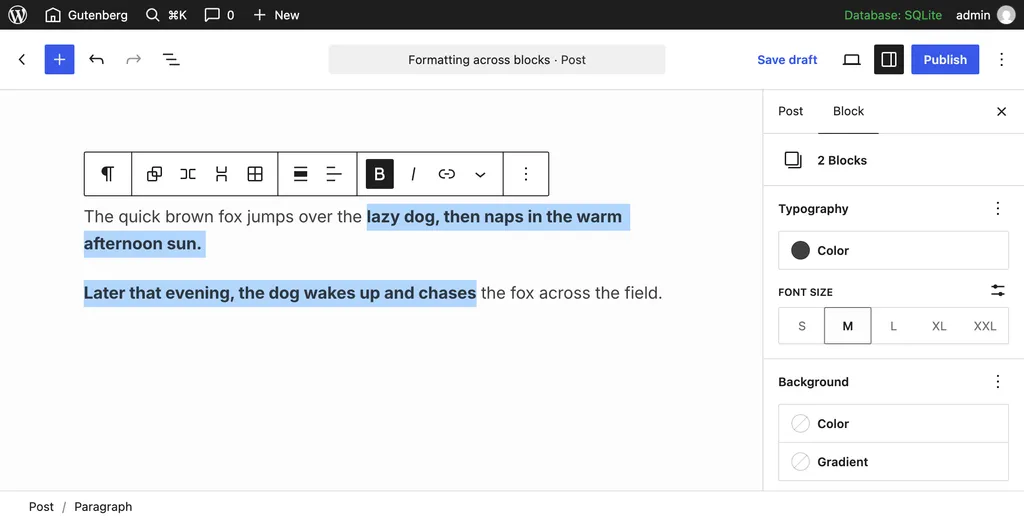
Editing and notes
- Multi-block selections. You can drag a selection by pressing anywhere inside it. Shift+click inside one block now keeps your text selection.
- Emoji reactions on notes. Notes, the editor’s comment feature, support five reactions: ❤️, 🎉, 😄, 👀, and 🚀. Unsent note text gets a draft marker.
- Non-breaking spaces. They show as a red dot, and a button swaps them for regular spaces.
Media, patterns, and saving
The Media inserter now uses the same grid as lists in the Site Editor. Audio and other files get proper previews.
“My patterns” is now “Site patterns” and has an author filter. Save and autosave errors now explain what went wrong, with a copy button and a details toggle. After a failed autosave, a countdown shows when the next try runs.
Before restoring a browser backup, the editor shows its date and compares it with your current content.
Security and what to do
Gutenberg 24.3 includes the security fixes from WordPress 7.1.4. If you run the plugin, update. Otherwise, make sure your site is on WordPress 7.1.4.
Test Gutenberg releases on a staging site first. They can change how the editor behaves.
End of article